Site Types and Function Code Topologies
PowerTrack Site Type Topologies
PowerTrack supports default visualizations and KPIs that are tailored to several key site types and utilize hardware function codes to interpret the configuration or hardware accurately and consistently across diverse OEMs and design basis.
Key Features that Consume Topology
The Site Overview Page is tailored to the site’s topology to provide a domain-specific view. The top right Site Profile Card in the header displays Site Type and configured site level POI/solar/storage capacities.
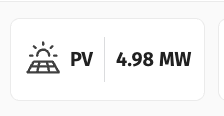
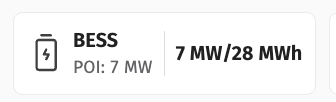
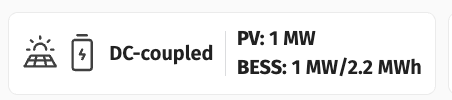
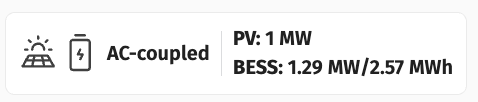

The Site Overview Chart (embedded as the default Chart 1 in the Overview Dashboard for new sites and available as a Built-In chart in Chart Builder under Site Aggregate section) shows you the timeseries data and the Power Flow Widget shows the current value and timestamp of solar, storage, load, and total production relative to expected power / POA and SOC where relevant.
- BTM Solar Example
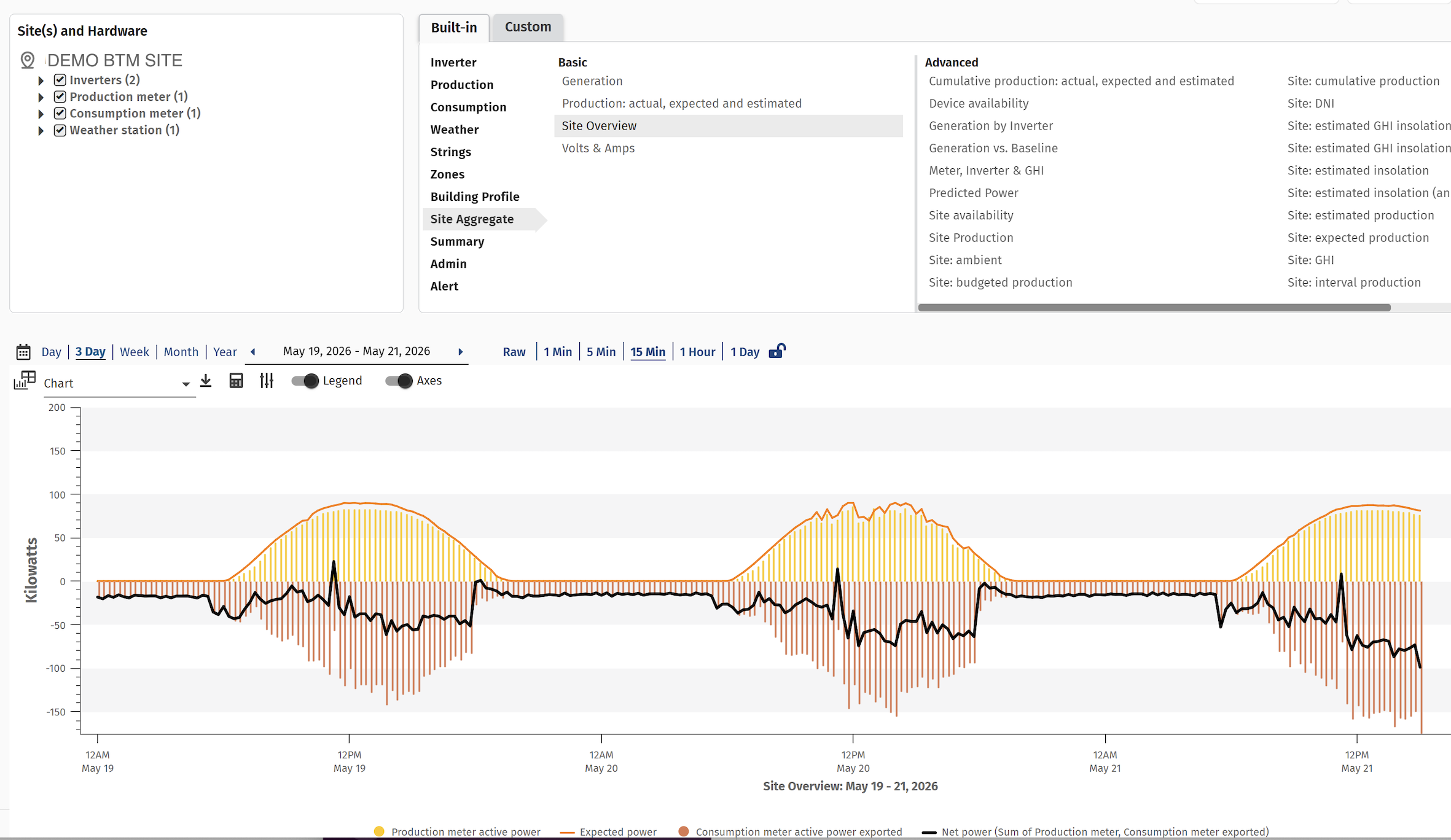
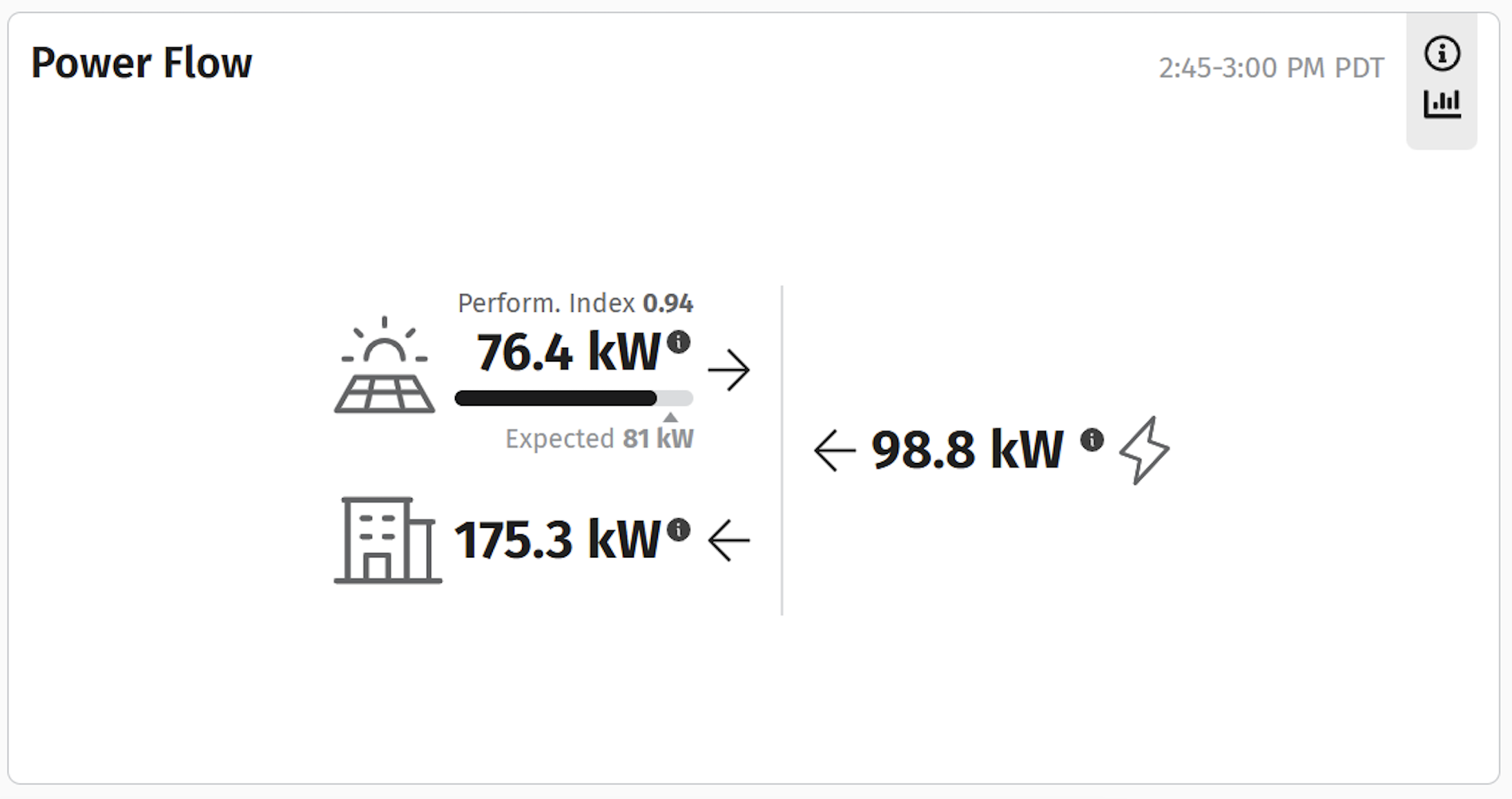
- FTM AC Coupled:
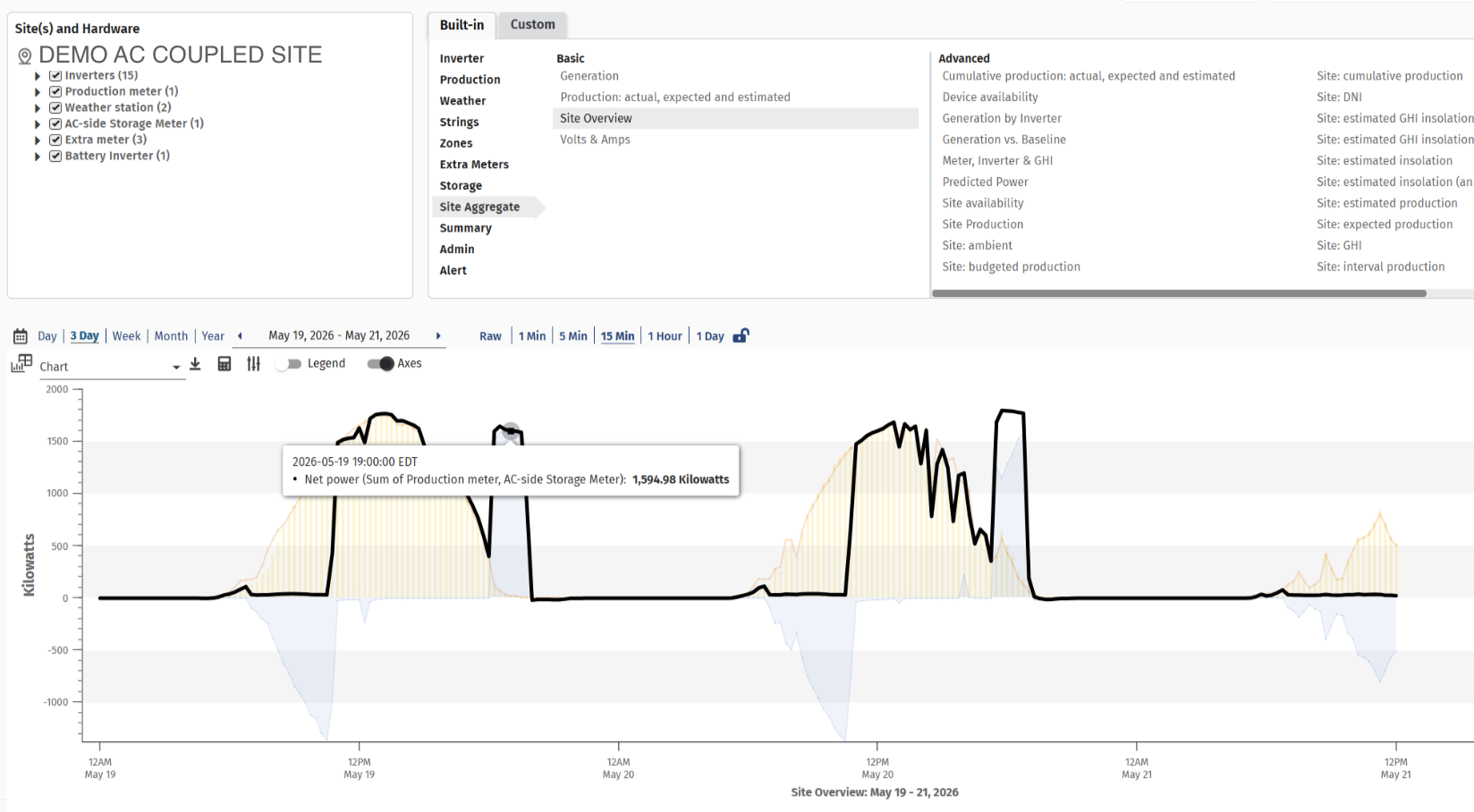
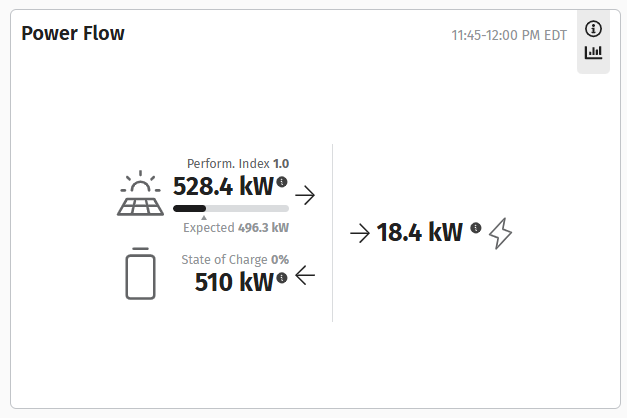
If you notice discrepancies on these charts, it may be a sign of misconfigured hardware Function Codes or Site Types.
Configurations
Site Type Configurations
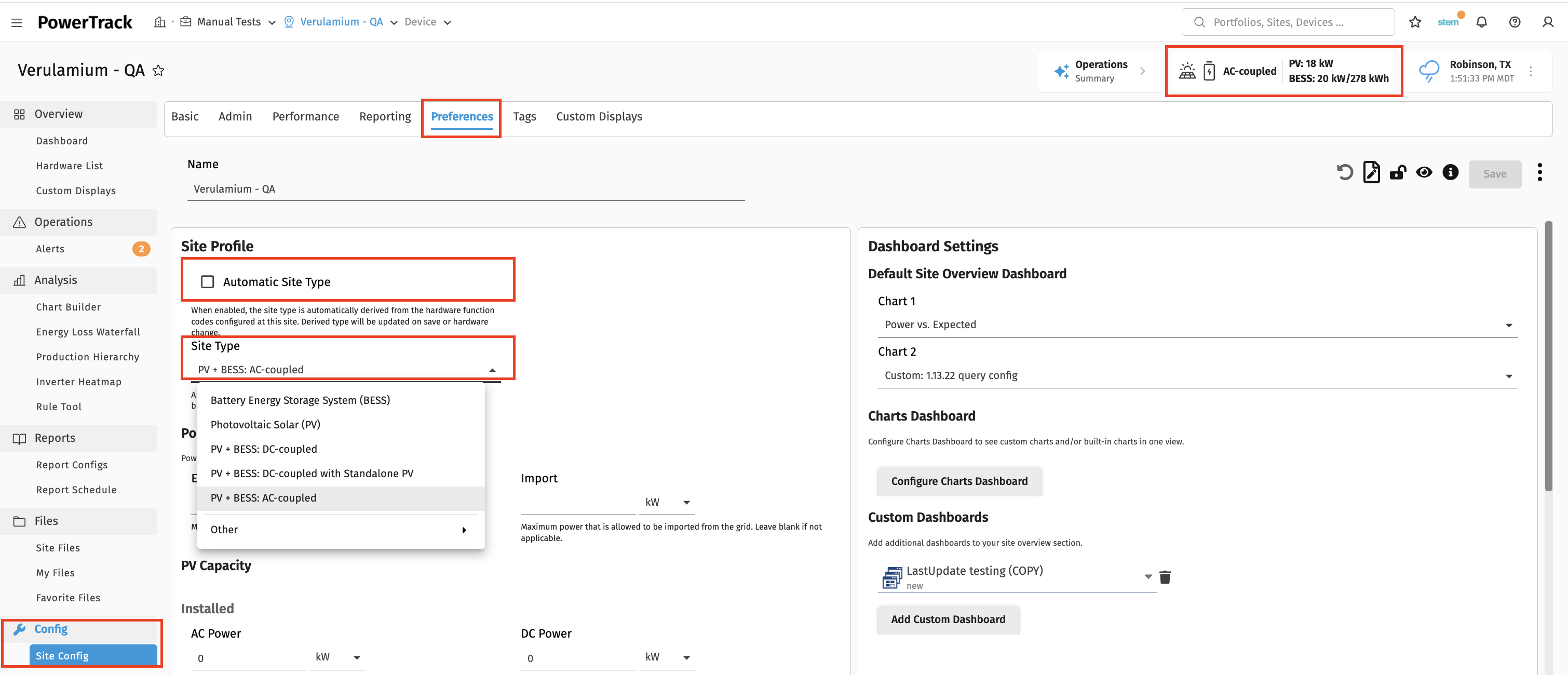
Site Type and corresponding capacities are configured at the site level. These settings can be found in Config --> Site Configuration --> Preferences if you need to configure or adjust metadata.
Automatic Site Type, if checked, will ensure that your Site Type is inferred from the function codes assigned to the project’s hardware. If the Automatic Site Type feature results in an incorrect Site Type, it is a good indicator that hardware function codes are misconfigured. While Site Type is managed through customer facing permissions, hardware Function Code adjustments must be requested through filing a support ticket.
Hardware Function Codes
The Data Dictionary is where you can find all function codes and associated Standard Data Names. Function Codes describe the type of equipment and how it is used. Standard Data Names are the data names that hardware drivers standardize registers names to and are commonly found for hardware associated with that function code. Standard Data Names allow for common visualizations of roll ups for hardware of similar Function Codes.
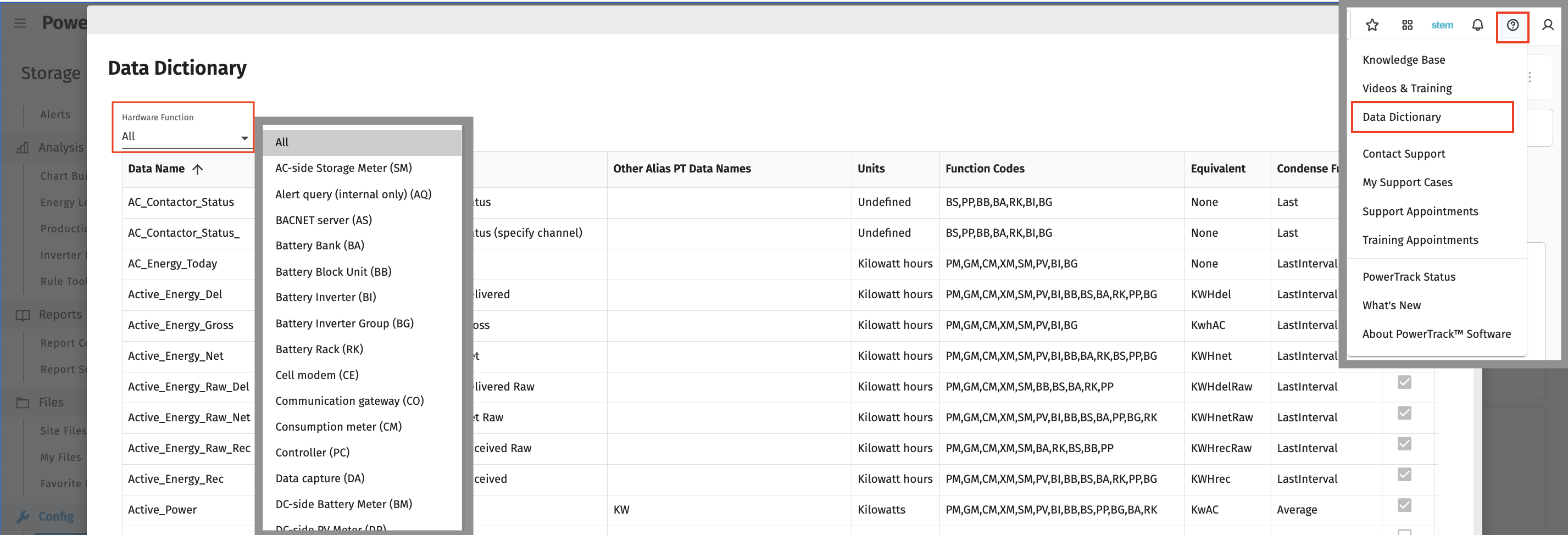
Additional description of Function Codes is found in this article: List of PowerTrack Hardware Function ID (FID) Codes
Topologies
Here are some common topologies a description of how they use PowerTrack Function Code definitions.
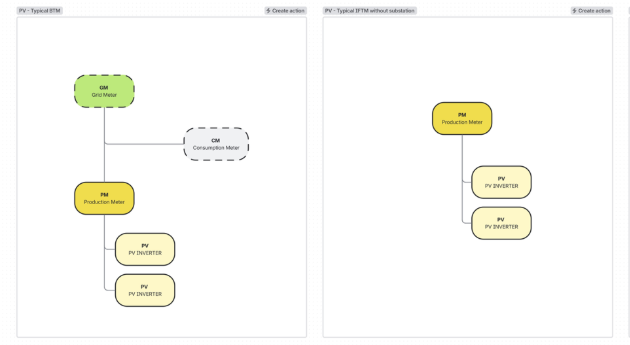
PV:
Production Meters summarize PV Inverter block production, with export displaying a positive sign convention. When a site is purely PV blocks, the Production Meter is considered the main meter. Grid Meter and Consumption Meters show importing and load as positive which is a common sign convention for behind the meter applications, to show total grid energy exchanged and facility consumption respectively. Net Meters should be used to describe the asset's total production (with exporting displaying a positive sign convention, common in in front of the meter applications). If there is parasitic consumption that sits behind a meter that is summarizing the PV production and that parasitic consumption, then that asset meter as not PV specific anymore and should therefore be called a Net Meter or Grid Meter depending on the sign convention rather than Production Meter.
BESS
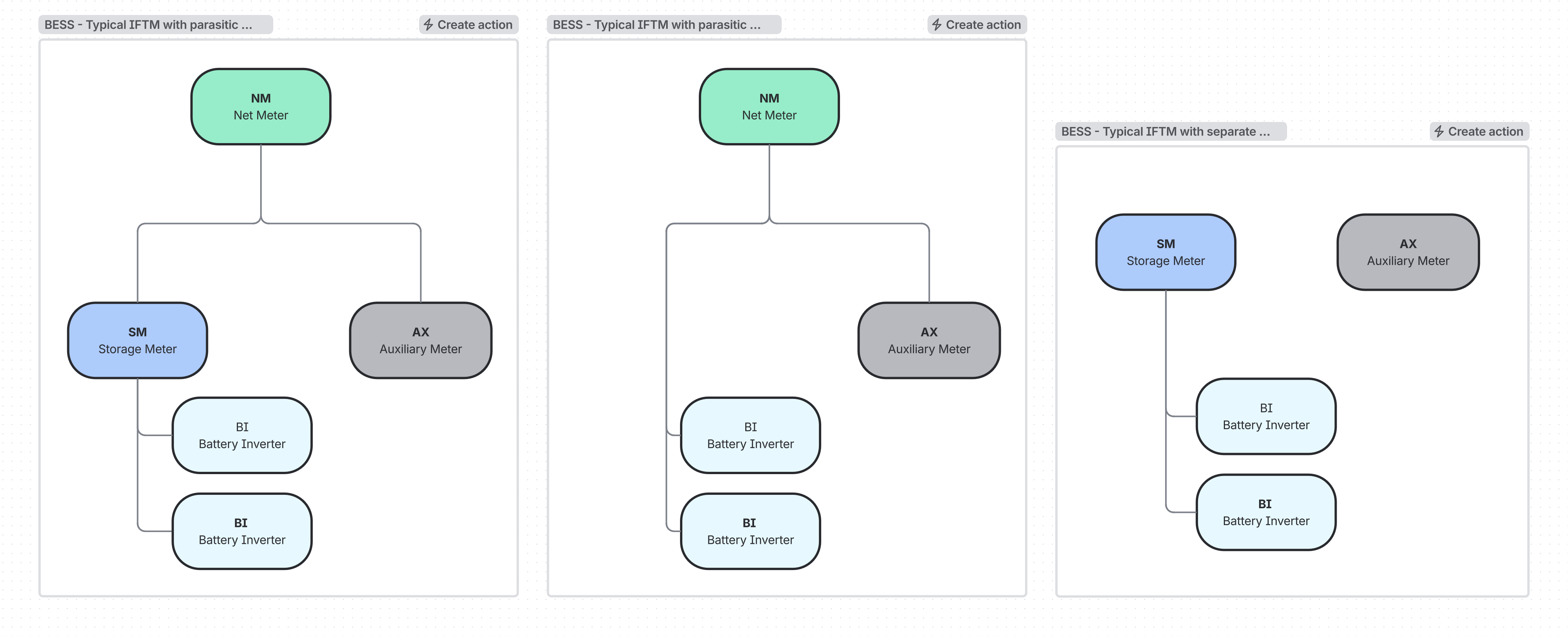
Storage Meters are AC side meters with only energy storage behind them. Net Meter may still describe the POI meter if there is also parasitic auxiliary systems behind the POI meter. The Auxiliary Meter's configured Parent Hardware configuration setting should dictate if the Auxiliary Meter is included in the Net Meter's total. NM, SM, and AX all follow the export is positive sign convention. This allows SM and NM to all align and consistently mean discharging energy is positive, and charging energy is negative, similar to AX's load.
PV BESS: AC Coupled
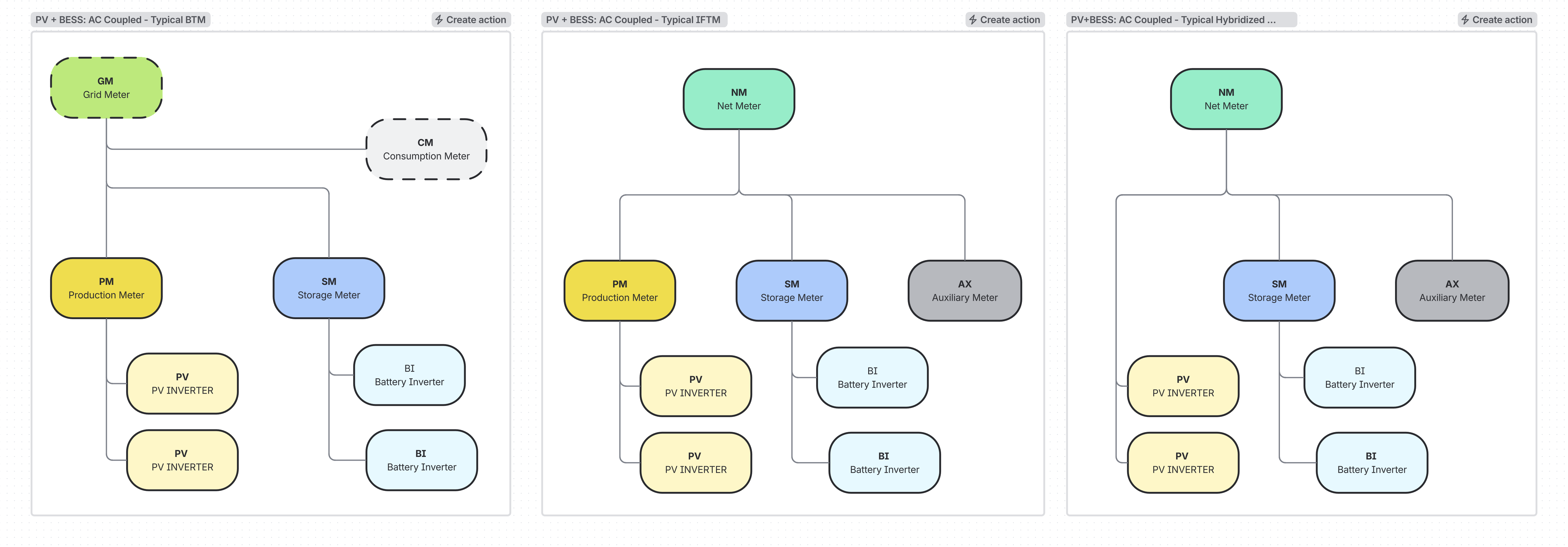
AC Coupled hybrid projects utilize Production Meters to summarize solar, and Storage Meters to summarize storage, with Net Meters summarizing the full generation of that asset. In various configurations for BTM, when there is a Grid Meter or an existing PV project that is hybridizing with BESS later, there may be some missing meters when there are sufficient ways to calculate sum or deltas of other meters to summarize various subsystems.
PV BESS: DC Coupled
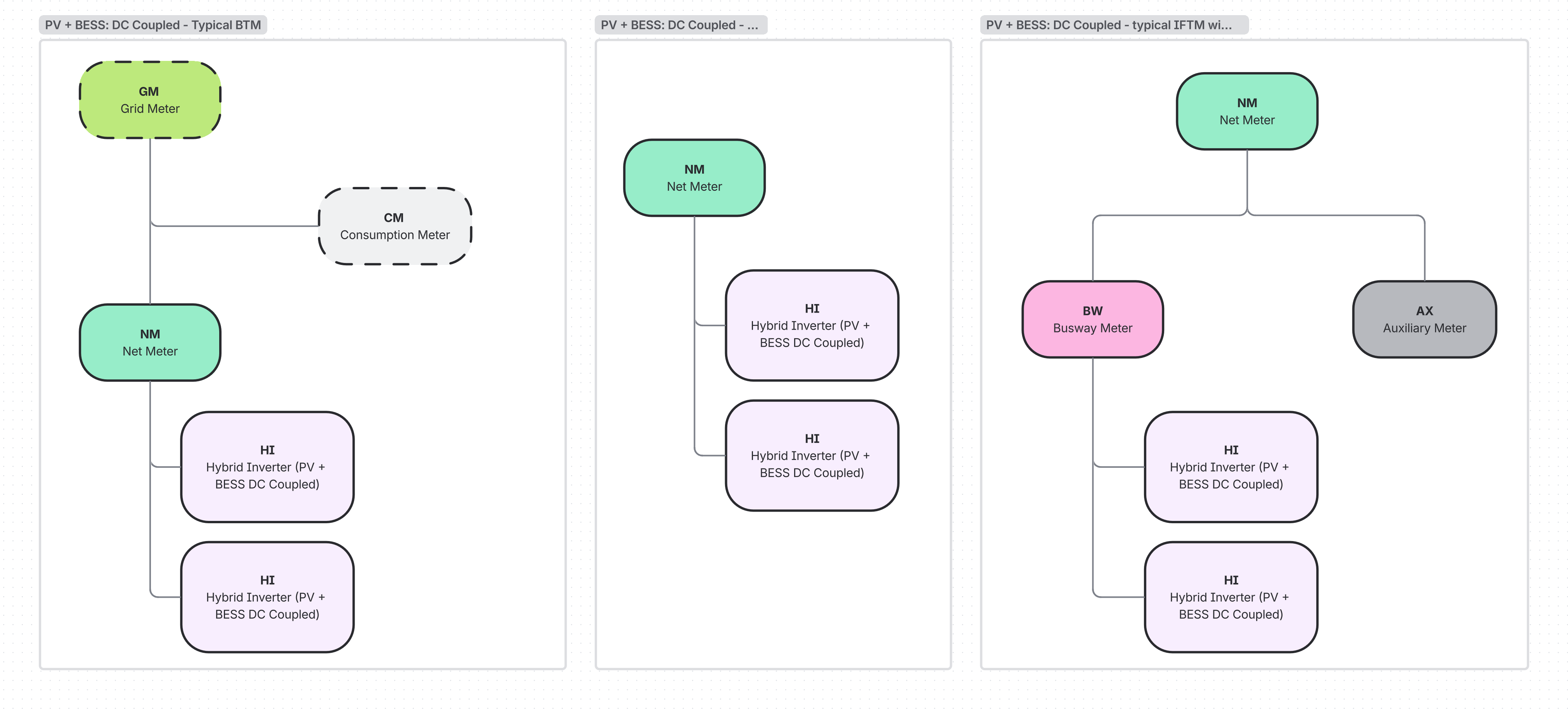
DC coupled blocks will use Hybrid Inverter function codes for the inverters that have both PV and BESS connected to the DC side. Net Meter is used to mean the DC coupled asset's total production because it is not specific to solar or storage like PM and SM are. If there are additional equipment on the substation like parasitic Auxiliary Meter, then Net Meter should correspond with the POI meter and a technology agnostic Busway Meter should be used for a circuit of DC coupled blocks.
PV BESS: DC Coupled with Standalone PV
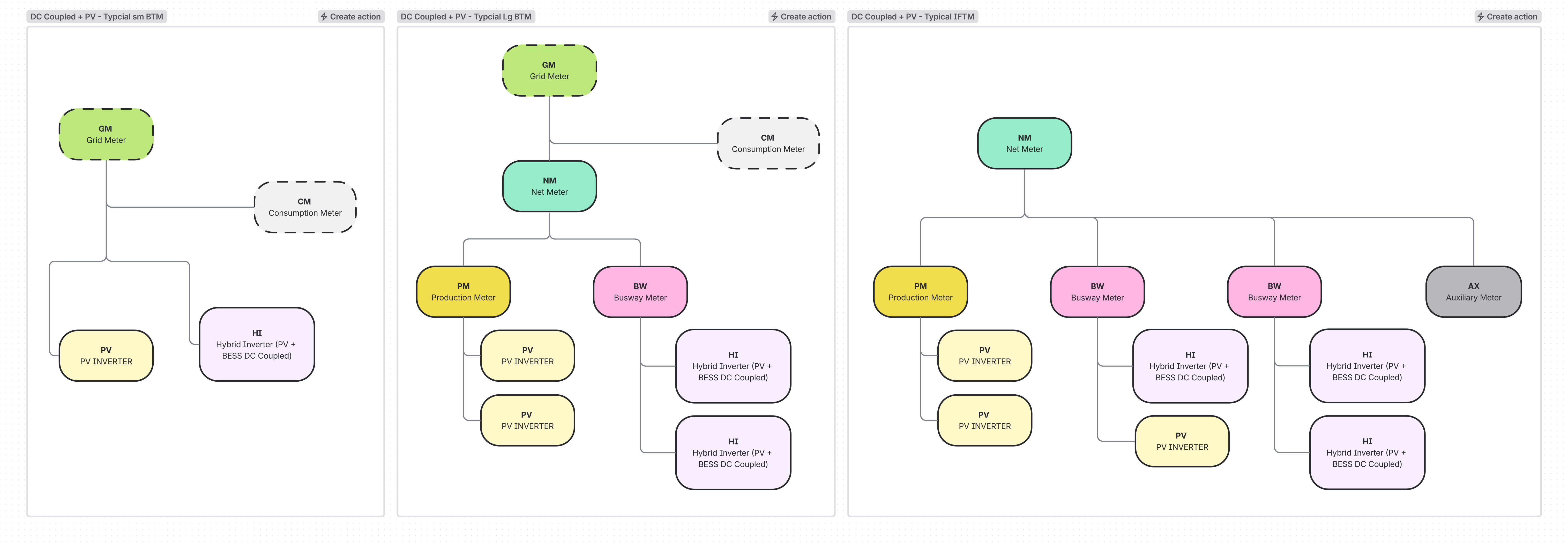
When there are PV only and DC coupled blocks, Production Meters should be used only if there is strictly PV behind it and Busway Meters should be used if there are DC Coupled blocks or a combination of PV and DC coupled blocks behind it. If it is the asset total, Net Meter should be used, describing generation as positive or Grid Meter should be used if it is using the convention of generation is negative. The sign convention tied to function code is important to ensure that charging vs discharging is accurately interpreted.
AC Metering Summary:
|
AC Meter Function Codes |
Polarity |
Intention: More details here: Function Code Usage DB |
|
CM: Consumption Meter |
Load = Positive. Expect values to only be positive |
Building load for BTM. |
|
AX: Auxiliary Meter |
Load = Negative. Expect values to only be negative |
Load from auxiliary equipment required to run the generating asset, often netted from a generating asset. |
|
PM: Production Meter |
Generation = Positive. Night parasitic load = Negative |
Assigned to meters with only PV behind them. Triggers expected energy calculations based on PV-only modeling. |
|
SM: AC Storage Meter |
Discharging = Positive, Charging/Load = Negative |
Assigned to AC meters with only storage behind them. |
|
GM: Grid Meter |
Generation/Discharging = Negative, Charging/Load = Positive |
Intended for POI meter IF customer wants generation = negative sign convention, common for BTM. |
|
NM: Net Meter |
Generation/Discharging = Positive, Charging/Load = Negative |
Intended for POI meter IF customer wants generation = positive sign convention & there is not a technology specific without separately metered aux alternative. |
|
BW: Busway Meter |
Generation/Discharging = Positive, Charging/Load = Negative |
AC bus meter for multi/non specific technology that is not redundant. |
|
XM: Extra Meter |
Generation/Discharging = Positive, Charging/Load = Negative |
For redundant meters or meters that don't fit a more specific type. Important to avoid duplicate summing within the same function code. |
Decision Tree
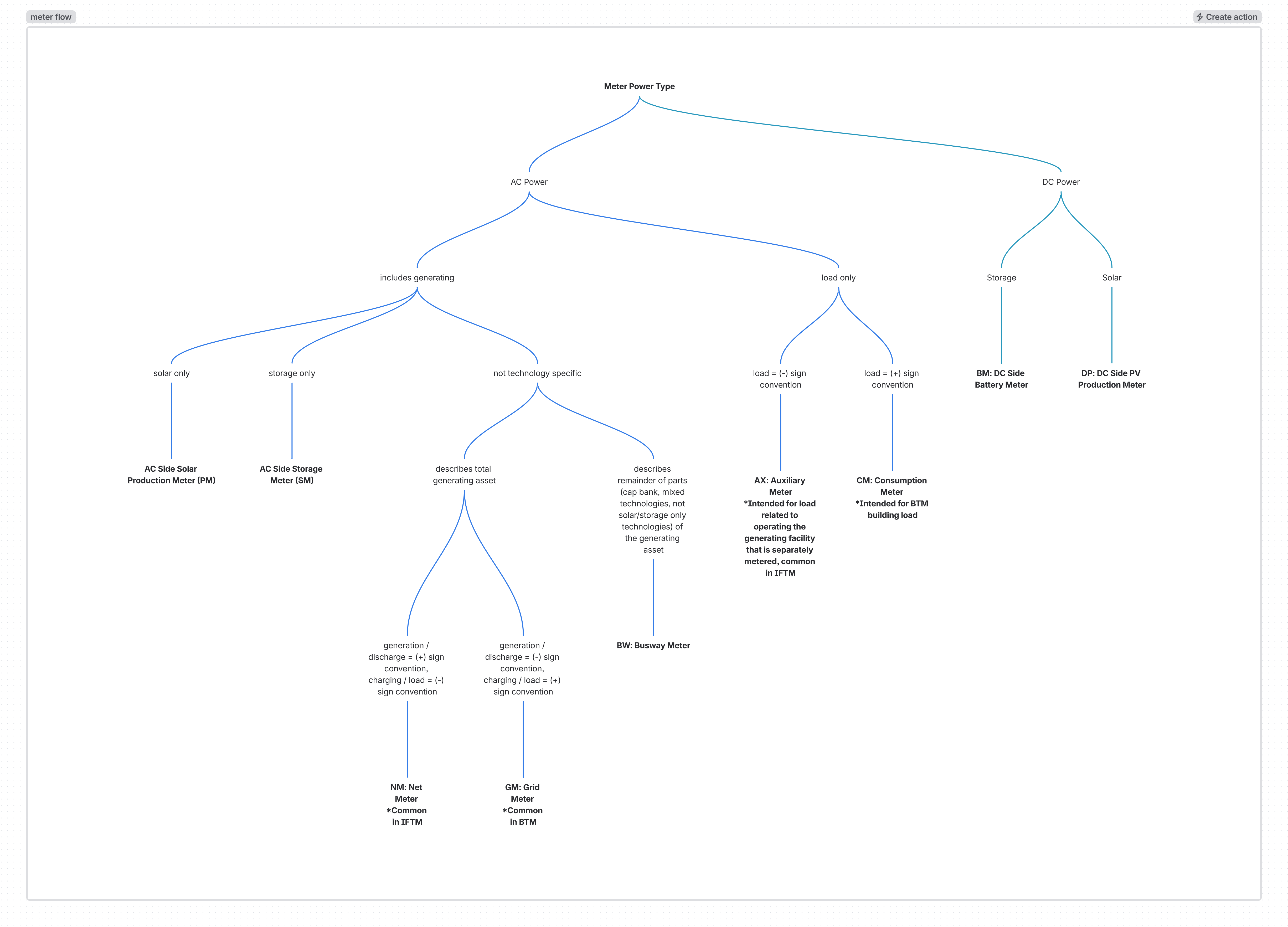
Note that polarity matters more than intention, so if a BTM project prefers the POI meter to be generation = positive values, then use a NM function code.
The Parent Hierarchy setting in a Hardware’s configuration is valuable to ensure alignment on what converter rolls up to inverter, inverter to meter, and meters to other meters. Function codes can get you close but not a complete picture.
Additionally GM, NM, AX, and CM are not exclusive and could be used together depending on the complexity of the generating asset that sits behind the meter.
Common Misconfigurations
Here are some general rules / context that can help fix some of the more common misconfigurations. This can help provide context as to why something is appearing backwards or missing and help provide a path to remedy quickly with help from our support team.
- IF a meter assigned to GM is intended to have the sign convention of export = positive, THEN it should be reassigned NM.
- IF a meter assigned to CM is intended to have the sign convention of export = positive, THEN it should be reassigned AX.
- IF a CM is showing net building load (load - solar) instead of just building load, THEN it should be a GM.
- IF an inverter (PV or BI) has both PV and BESS coupled on the DC side, THEN it should be a HI
- IF and only IF a meter is a DC meter, THEN it should either be BM if batteries behind it or DP if PV is behind it.
- IF an inverter has only storage behind it, THEN it should be a BI.
- IF an AC meter has more than solar behind it, THEN it should NOT be a PM.
- IF an AC meter has more than storage behind it, THEN it should NOT be a SM.
- PV used to be the default site type before Automatic Site Type was configured and therefore hybrids onboarded pre-mid 2025 may be listed as PV.
- Sometimes there is confusion if a site is AC or DC coupled. Function Code SM is an AC side storage Meter and BM is a DC side battery meter. An SM should only be used for AC coupled systems and a BM is almost always used only in DC Coupled systems and can be a good clue to if the hardware function codes and site type are correctly configured.
Automatic Site Type Logic:
As mentioned above, Automatic Site Type should ensure that a Site Type is accurate even as hardware get added in the case of hybridizing an asset. New sites will have this enabled by default and it can always be unchecked, and Site Type can be manually selected. Below is the logic that it uses for transparency:
-
IF has EMS or SM
-
IF [ac storage meter (SM) and production meter (PM)] OR [battery inverter (BI) and PV inverter (PV)]
-
“PV BESS: AC Coupled”
-
-
IF dc-to-dc converter (DC)
-
“PV BESS: DC Coupled”
-
-
IF no PV inverters (PV) or Production Meter (PM)
-
“Battery Energy Storage System (BESS)”
-
-
ELSE
-
“Custom”
-
-
-
ELSE IF
-
IF [pv inverter (PV) OR production meter (PM)]
-
“Photovoltaic Solar (PV)”
-
-
-
ELSE
-
“Custom”
-
Article Number: 1883
Author: Wed, May 18, 2022
Last Updated: Fri, Oct 23, 2026
Author: clara.midgley@stem.com
Online URL: https://kb.alsoenergy.com/article.php?id=1883